Private tutoring in Egypt, organised

Every grade, attendance and fee — live.

MarksPulse gives every tutor their own space for groups, timetable, register, marks, homework and fees. Each family follows its children as it happens, instead of waiting for the end of the month.

  • Arabic and English
  • iPhone and Android
  • Each teacher's data is private
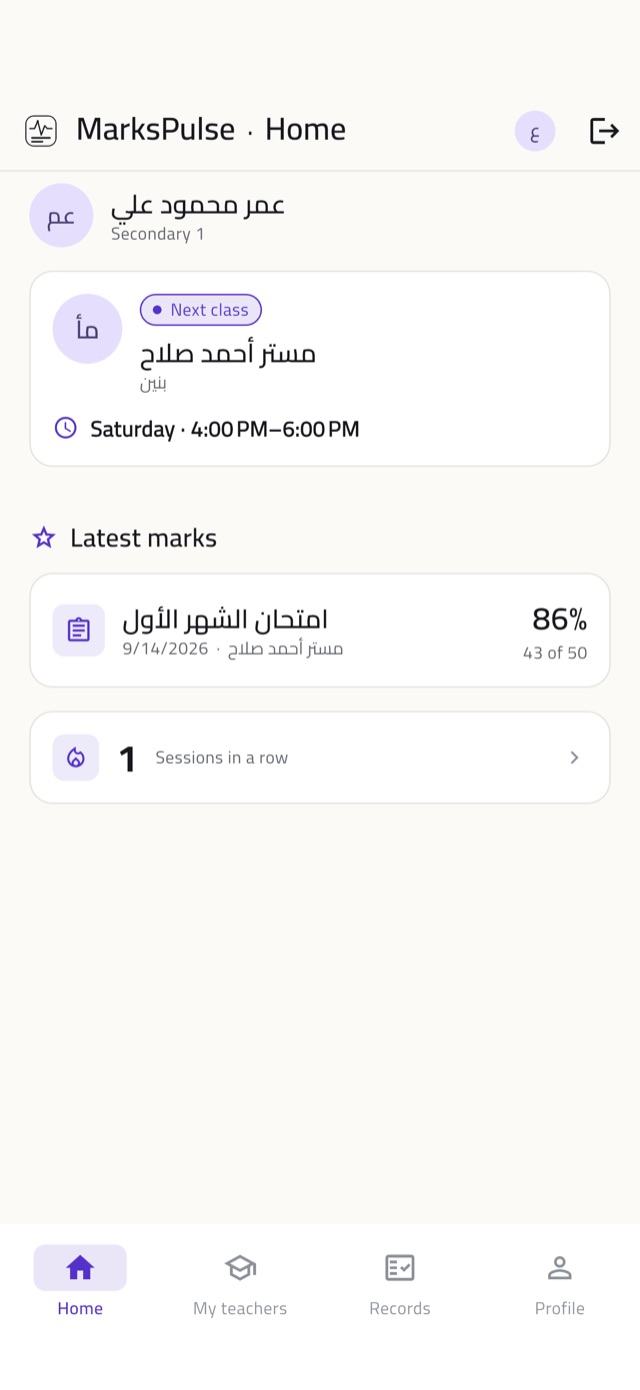
A parent's home screen: the next class, the latest mark and an attendance streak
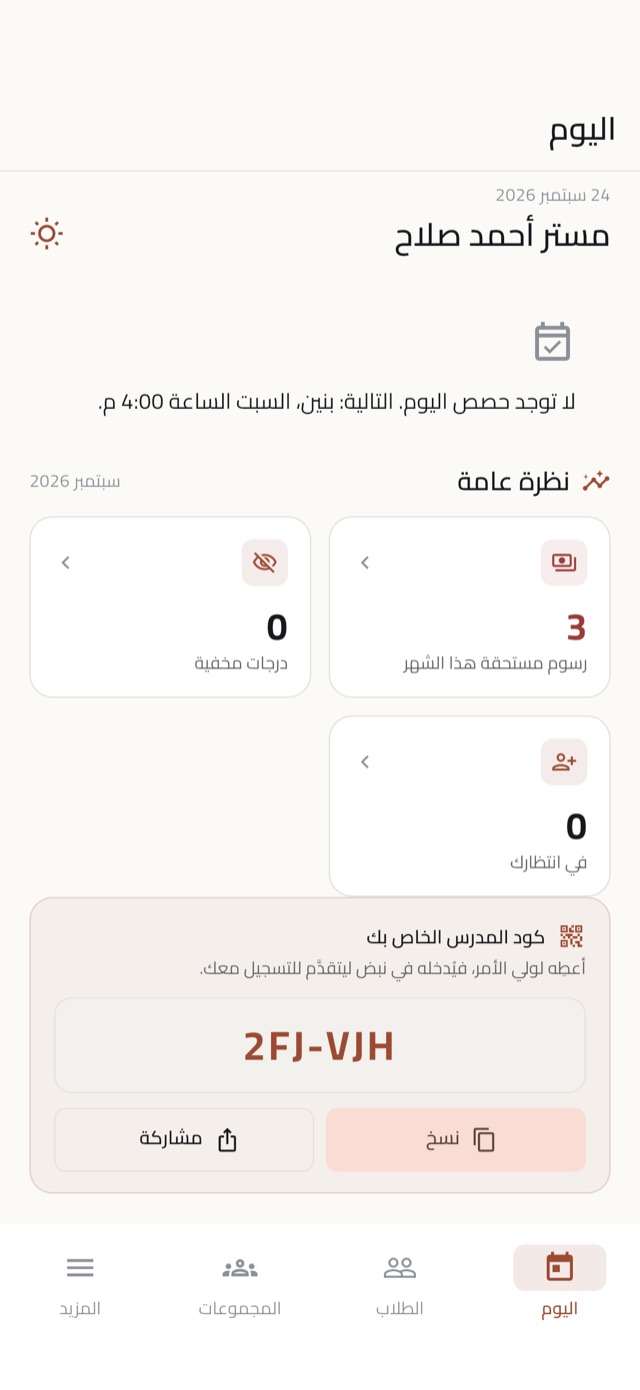
A teacher's Today screen in Arabic: fees due, hidden marks and the teacher's code
Present · Saturday 4:00 PM New mark · 43 of 50

The idea

The tutor's notebook, made live.

Private lessons in Egypt run on paper registers, WhatsApp groups and memory. A parent finds out about an absence weeks later. A teacher chases fees from a list on the back page. MarksPulse keeps the same register and shares it with the people it concerns, the moment it is written.

Every teacher is their own platform

Each tutor gets a private space with their own students, colours and logo. No teacher can see another teacher's students.

Recorded once, seen at once

Attendance, published marks, homework and payments reach the family the moment the teacher saves them, with a notification.

One family account, every teacher

Parents add all their children once. Each child can study with any number of teachers, in any subject, and it all shows up in one app.

How it works

From a teacher's code to a live record, in three steps.

  1. The teacher sets up

    They add their subjects, school years and groups with weekly class times, then share their six-character teacher code or a ready-made poster.

  2. The family applies

    A parent enters the code, or searches for teachers nearby by subject, school year, boys or girls, and day. One tap sends the application.

  3. Everyone stays in step

    The teacher accepts and places the child in a group. From then on, every register, mark, homework and fee is live for the family.

Who it's for

Four roles, one app.

Everyone signs in to the same app and sees exactly what their role allows, nothing more.

For teachers

Run your whole tutoring business from your phone.

The owner of the space. They decide what is taught, when, for how much, and who helps.

  • Set up onceSubjects, school years, groups for boys, girls or mixed, weekly class times, and the monthly fee for each year.
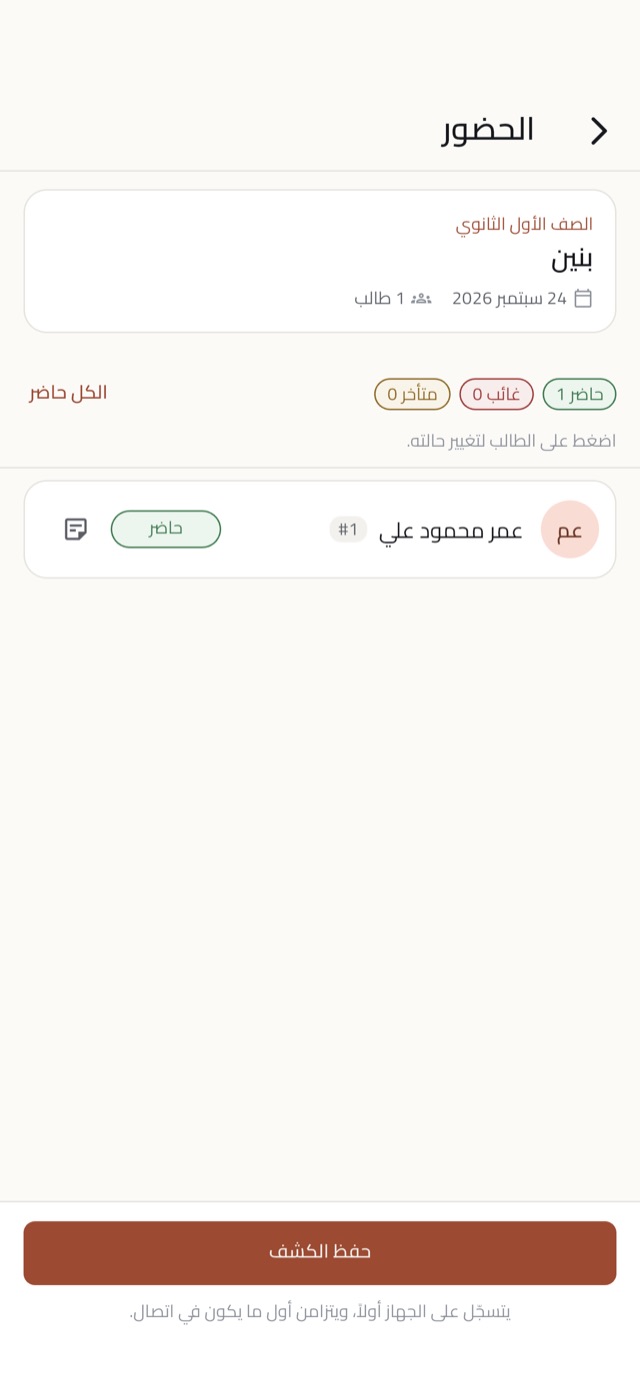
  • Take the register in one tapToday opens on the classes happening now. Mark present, late, absent or excused, with a note when needed.
  • Marks and homeworkCreate an exam, enter the marks, and publish when you are ready. Families see nothing before that. Set homework and tick it off per student.
  • Fees at a glanceOne board shows who has paid each month and who is still due, for every school year.
  • Grow and communicateAccept applications, open or close registration, send announcements to a group, a year or one student, and export lists as PDF or Excel.
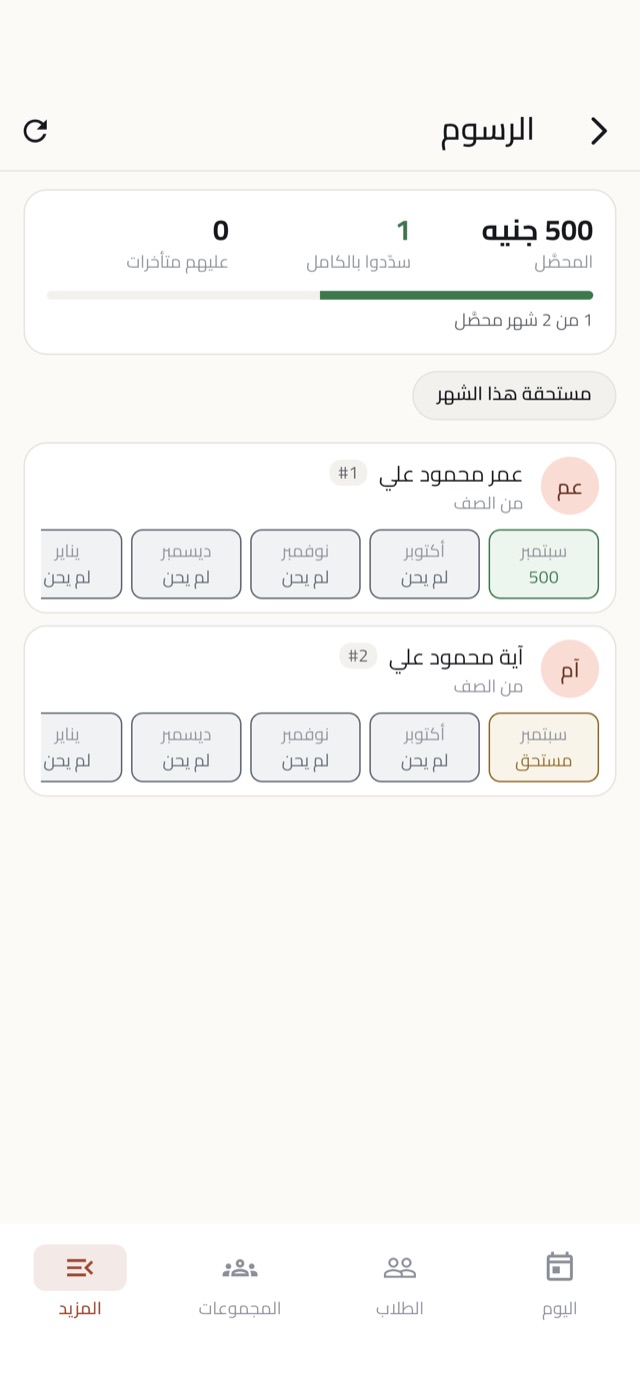
The teacher's monthly fee board, in Arabic
For assistants

Help at the door, with exactly the access you are given.

A helper inside one teacher's space. The teacher creates the account and chooses what it can do.

  • Permissions, one by oneThe teacher ticks what the assistant may do: take attendance, enter marks, set homework, collect fees, manage the roster, send announcements and more.
  • Limited to their classesAn assistant can be kept to certain school years or groups, so they only record for the classes they handle.
  • Same app, same screensThey take the register, fill the mark sheet and collect a payment exactly as the teacher would.
  • Hand out the codeAn assistant can share the teacher's code with new families, so applications keep coming in.

Prices and other assistants stay with the teacher. Every change is logged with who made it.

Taking the register for a group, in Arabic
For parents

Know how your children are doing, every week, not every term.

The family account. It owns the children's profiles and sees everything about them, money included.

  • All your children, one accountAdd each child once. Switch between them with a tap, each with their own teachers.
  • Find a teacherSearch near your home by subject, school year, boys or girls, and weekday. Compare prices and places left, then apply in one tap. Or just enter a teacher's code.
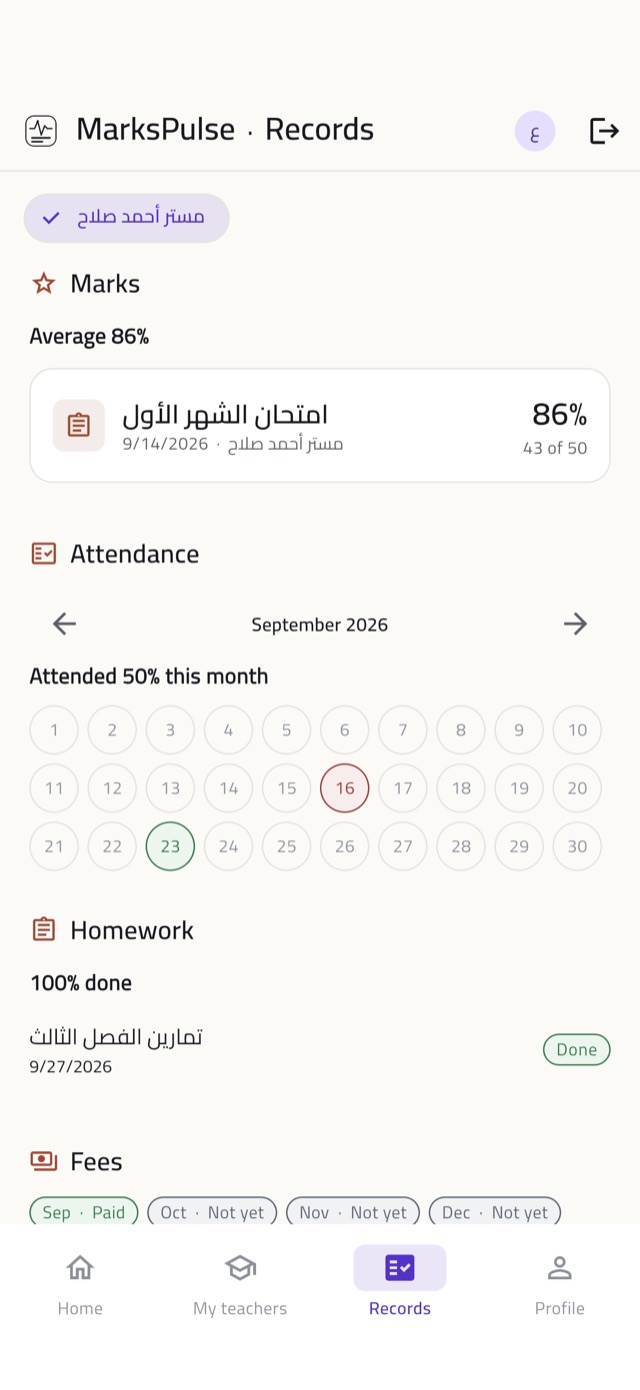
  • Follow every lessonThe next class, attendance by month, published marks with a trend, homework status, and the teacher's comments.
  • Fees with no surprisesSee which months are paid and which are due with each teacher.
  • Notified as it happensAn absence, a new mark, new homework, an announcement or a fee due, each switchable on or off.

You can make your child their own login with a username, no email needed. A second parent can join with a one-time code you share.

A child's records: marks, attendance calendar, homework and fees
For students

Your timetable, your marks, your progress.

A student signs in on their own phone and sees their own lessons, read-only.

  • Sign in with a usernameThe parent creates it, so no email address is needed. A student with an email can also join with a code from their parent.
  • What's nextThe next class with a countdown on the day, across every teacher.
  • See progressLatest marks, an average with a trend line, and an attendance streak to keep going.
  • Never miss homeworkEverything that was set, with its due date and whether it was marked done.

A student sees only their own profile, not their brothers' or sisters', and never the fees.

The student's home: next class, latest mark and streak

Features

Built for how tutoring actually works here.

Attendance

Present, late, absent or excused, per class, with a month view for every student.

Exams and marks

A mark sheet per group. Marks stay hidden until the teacher publishes them.

Homework

Set it for one or several groups with a due date, then mark it done, partial or missing.

Monthly fees

Paid or due, month by month, by school year. The current month is never shown as overdue.

Announcements and alerts

Messages to a group, a year or one student, and push notifications in the reader's own language.

Find a teacher

Search by place, subject, school year, gender and day, nearest first, with prices and places left.

Privacy by design

Children's records, treated that way.

Most of what MarksPulse holds is about children. These rules are enforced on our servers, not just hidden in the app.

Read the privacy policy

A teacher sees only their own students

No teacher can see another teacher's students, or know that they study elsewhere.

Marks stay private until published

A family cannot read a mark until the teacher decides to publish the exam.

The family owns the child's profile

Only the parent edits a child's details. Teachers read them, and money is shown to the parent alone.

Leave whenever you like

Any account can be deleted from the app or from this website. Records are kept for one school year only.

For teachers

Your own platform, not someone else's.

Your name, your logo, your colours, your students. Families see only what you publish.

  • Apply as a teacher from the app. We review every application.
  • You can sign in straight away. Your space opens as soon as you are approved.
  • Add assistants whenever you need help at the door.

Questions

Good to know.

How does my child join a teacher?

Add your child in the app, then either enter the teacher's six-character code or find the teacher in the search, and press Apply. The teacher accepts and picks the group, and you are notified.

Does my child need an email address?

No. A parent can create a login for each child with a username and password. The child signs in with that, and sees only their own lessons.

Who can see my child's marks and attendance?

The child's own teachers and their assistants, the parent, the child, and any second parent you invite with a one-time code. Marks appear only after the teacher publishes them.

Can my child study with more than one teacher?

Yes, with any number of teachers and subjects. Each teacher appears with their own colour, and the home screen brings the next class from all of them together.

Is the app in Arabic or English?

Both, fully. Switch the language at any time from the Profile or More tab. Notifications follow the language you chose.

How do I delete my account?

From the app's settings, or from the account deletion page without installing anything. That page also explains what is kept and why.

Get MarksPulse.

One app for teachers, assistants, parents and students.